MATRIX - High-Performance Linear Algebra Kernels in C from Scratch
Published:
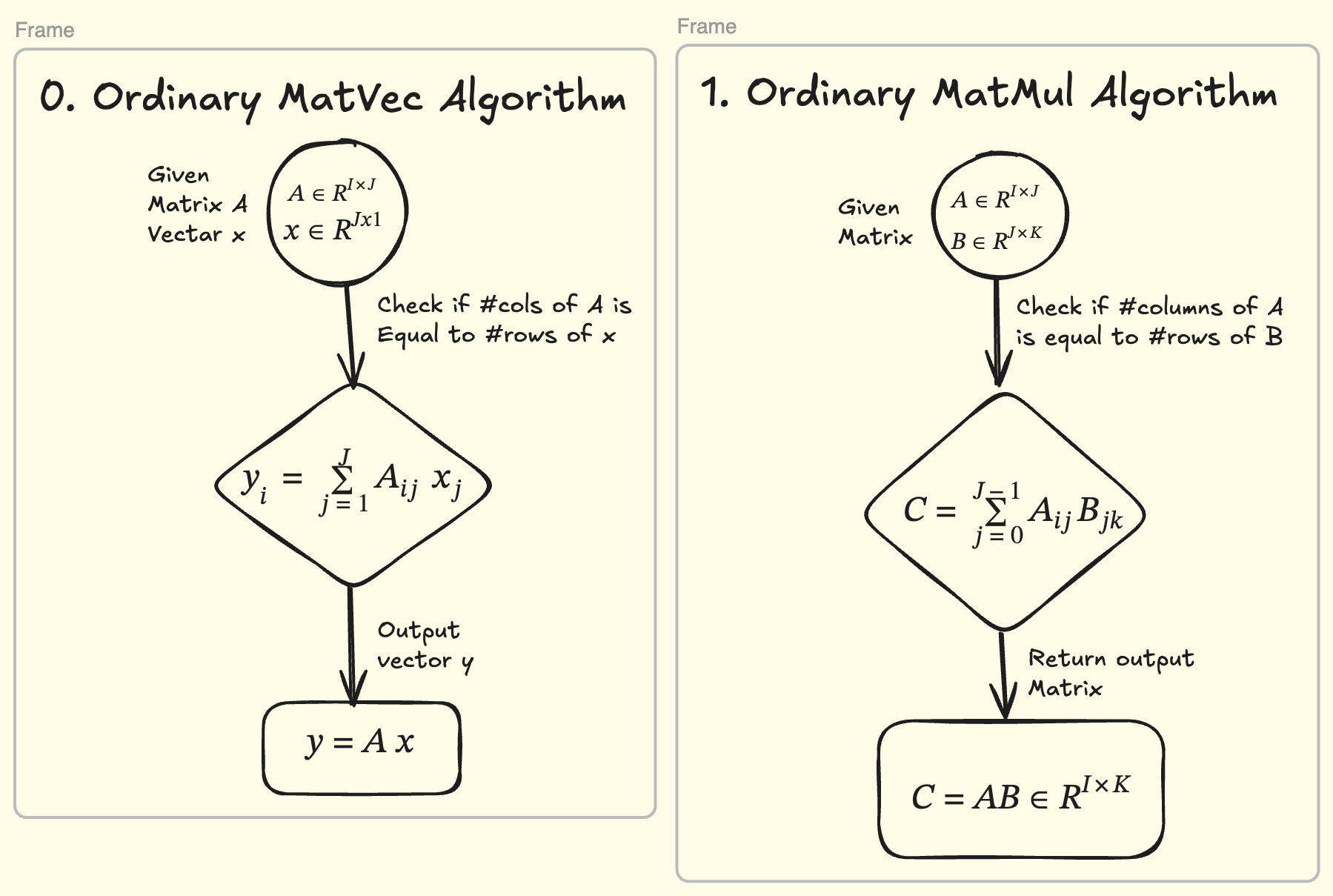
In any high-performance numerical workload — deep learning, scientific simulation, finite-element solvers — two operations are at the core of the entire stack:
- Matrix–Matrix multiplication (GEMM)
- Matrix–Vector multiplication (GEMV)
Matrix–matrix multiplication shows up everywhere — but it is the matrix–vector product that dominates when you stream data through a layer at a time, and both are the reason your programs are fast or slow.
1. Why GEMM dominates
Almost the entire field of dense linear algebra sits on two stones:
| Layer | What it does |
|---|---|
| naive loops | a triple for loop nobody should ship to production |
| BLAS kernels | tuned matmul / matvec built over decades of cache and register tuning |
Every framework you actually use rides on the second layer:
- LAPACK is implemented in terms of BLAS level-1/2/3 routines.
- OpenBLAS, GotoBLAS, BLIS are exactly this — hand-tuned kernels plus a packing / blocking harness around them.
- LLM inference leans hard on matrix-vector per-token work.
flowchart LR
    NAIVE["naive triple loop"] --> ADD["AddDot extraction"]
    ADD --> UNROLL["unrolling / ILP"]
    UNROLL --> MK["fused micro-kernel"]
    MK --> REG["register accumulators"]
    REG --> PTR["pointer arithmetic"]
    PTR --> VEC["vectorization / SIMD"]
    VEC --> BLOCK["cache blocking (mc x kc)"]
    BLOCK --> PACK["matrix packing"]
    PACK --> PEAK["near-peak BLAS kernels"]
So the question in front of us is: how do we write kernels like OpenBLAS from scratch? This article is the story of that journey — turning a naive triple-loop matrix multiply and matrix-vector multiply into cache-aware, vectorized micro-kernels in plain C, following the classic FLAME “How to Optimize GEMM” ladder, one step at a time.
2. What MATRIX is
MATRIX is our answer to that question: a hands-on, fully documented study of how a naive triple loop becomes a near-peak kernel. It ships 30 self-contained, runnable optimization levels — 15 for matmul, 15 for matvec — plus the complete mathematics behind every single one.
You get:
- Two kernel families —
C = A·B + Candy = A·x + y, in BLAS-compatible column-major layout. - A visible ladder — every level is an executable that times itself and prints GFLOPS, so you watch performance climb (or explain why it dips).
- No black boxes — C99, no external math libraries, no intrinsics required for the portable levels.
- The math, in full — one research note per level, with the FLOP and cache reasoning behind each step.
flowchart LR
    U["your code / examples"] --> API["matmul() / matvec()<br/>C, column-major"]
    API --> LADDER["optim0 .. optim14<br/>30 runnable levels"]
    LADDER --> HW["CPU caches + SIMD<br/>NEON / SSE / AVX"]
    HW --> GF["GFLOPS, roofline-visible"]
    style HW fill:#2d6a4f,color:#fff
3. Who is this for?
| Audience | What you get |
|---|---|
| Students / learners | A from-first-principles codebase: dot products, register tiling, SIMD, cache blocking, packing — plus a full tutorial walkthrough with the mathematics of every level |
| Developers writing BLAS-like kernels | A complete, runnable reference ladder to read, extend, and steal techniques from |
| Performance / HPC engineers | A working roofline lab: run the ladder, watch arithmetic intensity move you from memory-bound to compute-bound |
4. The journey — a curated tutorial list
To help you navigate building high-performance kernels with MATRIX, this series covers the path we took, in dependency order:
| # | Tutorial | Topic |
|---|---|---|
| 00 | https://ajeetkbhardwaj.github.io/matrix/tutorials/ | Overview of the ladder |
| 01 | https://ajeetkbhardwaj.github.io/matrix/tutorials/01-build-and-run/ | Build & run the ladder |
| 02 | https://ajeetkbhardwaj.github.io/matrix/tutorials/02-gflops-and-roofline/ | Reading GFLOPS & the roofline |
| 03 | https://ajeetkbhardwaj.github.io/matrix/tutorials/03-matmul-from-naive-to-kernel/ | matmul: naive → micro-kernel |
| 04 | https://ajeetkbhardwaj.github.io/matrix/tutorials/04-matmul-blocking-and-packing/ | matmul: blocking & packing |
| 05 | https://ajeetkbhardwaj.github.io/matrix/tutorials/05-matvec-four-output-kernel/ | matvec: the 4-output kernel |
| 06 | https://ajeetkbhardwaj.github.io/matrix/tutorials/06-writing-a-new-level/ | Writing optim15 yourself |
The complete mathematics lives in 30 research notes — one per level — for which the maps below link straight to the source-grade math.
matmul: C = A·B + C
| Level | Research note | Core idea |
|---|---|---|
| optim0 | naive triple loop | the memory-bound baseline, ~1 GFLOPS |
| optim1 | AddDot extraction | factor the inner dot product |
| optim2 | unrolling by 4 | four columns at once, more ILP |
| optim3 | fused AddDot1x4 | one pass over p, reuse A(i,p) 4× |
| optim4 | register accumulators | stop touching C inside the loop |
| optim5 | pointer advancement | pointer arithmetic + 4× unroll |
| optim6 | 4×4 via AddDot | structural step — the square tile |
| optim7 | fused 4×4 kernel | one loop, sixteen outputs, rank-1 update |
| optim8 | register-tiled 4×4 | the classic micro-kernel, 16 FMA chains |
| optim9 | pointer-based A | drop the per-element lda multiply |
| optim10 | statement reordering | better instruction scheduling for ILP |
| optim11 | SSE vectorized 4×4 | 8 vector accumulators instead of 16 (x86) |
| optim12 | cache blocking | mc × kc panels that fit in cache |
| optim13 | packing A | contiguous 4×k panels |
| optim14 | full packing + pointers | pack A and B, stride-free hot loop |
matvec: y = A·x + y
| Level | Research note | Core idea |
|---|---|---|
| optim0 | naive matvec | the raw baseline, memory-bound by construction |
| optim1 | AddDot extraction | factor the inner dot product |
| optim2 | 4× reduction unroll | unroll p, single accumulator chain |
| optim3 | fused AddDot1x4 | the big jump: four outputs, broadcast x |
| optim4 | register accumulators | four independent chains live in registers |
| optim5 | pointer-advanced x | pointer x + 4× reduction unroll |
| optim6 | AddDot4x1 wrapper | the named 4-output routine |
| optim7 | fused AddDot4x1 | the fused 4×1 micro-kernel |
| optim8 | register-bound AddDot4x1 | accumulators held for the whole loop |
| optim9 | pointer-based A | drop the lda multiply |
| optim10 | statement reordering | reorder + (optional) OpenMP hooks |
| optim11 | portable auto-vectorization | no intrinsics — NEON/SSE/AVX via compiler |
| optim12 | cache blocking | kc reduction + mc row blocks |
| optim13 | packing A | contiguous panels for streaming reads |
| optim14 | fully packed pointer kernel | stride-free, packed 4×1 kernel |
Run the ladder and watch: matvec jumps at optim3 (four independent chains), matmul jumps at optim8 (the register tile) and again at optim12–14 (cache blocking + packing).
5. Project links
| Resource | Where |
|---|---|
| Source code (GitHub) | https://github.com/ajeetkbhardwaj/matrix |
| Documentation site | https://ajeetkbhardwaj.github.io/matrix/ |
6. Quick start — from zero to GFLOPS in three commands
Requires: a C99 (or later) compiler (
gcc,clang, or MSVC) andmake(optional — you can rungccdirectly). No external math libraries.
git clone https://github.com/ajeetkbhardwaj/matrix && cd matrix
make                # builds all 25 portable levels + reference drivers
make test           # runs the numerical correctness suite
Run a level
Every optimization level is its own executable; it allocates random data, times the kernel, and prints seconds + GFLOPS:
./build/matvec5
# Optimization 5 : Dot product took 0.0001234 seconds GFLOPS : 6.48

./build/matmat8
Run the whole ladder and watch the numbers climb:
for i in $(seq 0 14); do ./build/matvec$i; done
for i in $(seq 0 10); do ./build/matmat$i; done
The “reference” GFLOPS formula
GFLOPS = 2 · (number of multiply-adds) / time
- matmul:
2 · m · n · k - matvec:
2 · m · k
7. Building & using it — four ways
Build a single level directly with gcc/clang
# matrix-vector, level 5
gcc -O2 -I include -o build/matvec5 src/matvec/optim5.c

# matrix-matrix, level 8
gcc -O2 -I include -o build/matmat8 src/matmat/optim8.c
Call the reference kernel from your own code
#include <gemm.h>

/* C = A·B + C, all double, column-major */
matmul(m, n, k, a, lda, b, ldb, c, ldc);
#include <matvec.h>

/* y = A·x + y, A is m×k column-major */
matvec(m, k, a, lda, x, y);
A(i,j) lives at a[j*lda + i] (Fortran / BLAS convention) throughout.
Off-the-shelf examples
examples/ has copy-paste-ready drivers for both kernels:
gcc -O2 -I include -o build/ex_matmul examples/matmul_driver.c src/matmul.c
gcc -O2 -I include -o build/ex_matvec  examples/matvec_driver.c  src/matvec.c
Optionally faster: the x86 SSE levels
# needs your own sse_compat.h on the include path
make ssematmat
8. Under the hood
flowchart LR
    subgraph Matrix["matrix"]
        NAIVE2["naive baselines (optim0-2)<br/>dot products, unrolling"] --> FUSE["fused micro-kernels (3-5)<br/>register accumulators, pointers"]
        FUSE --> TILE["4x4 / 4x1 register tiles (6-8)<br/>the canonical micro-kernel"]
        TILE --> VEC2["vectorization (9-11)<br/>SSE or portable auto-vector"]
        VEC2 --> CACHE["cache blocking + packing (12-14)<br/>panels, packed buffers, stride-free"]
    end
| Subsystem | One-liner |
|---|---|
| kernels | 30 standalone levels (src/matmat/optim*.c, src/matvec/optim*.c) — each with its own main() |
| reference API | include/gemm.h / include/matvec.h — library kernels to link into your own code |
| tests | tests/correctness.c validates matmul() against a naive triple loop, including cache-blocking boundaries and “fringe” sizes |
| docs | mkdocs site: 6 tutorials + 30 research notes (one per level, full math) |
| build | one Makefile, outputs to build/, targets: make, make test, make ssematmat |
Everything is hand-written C99 with no external dependencies — the micro-kernel is exactly the shape modern BLAS libraries use in production.
9. Supported platforms
| Compiler | OS | Notes |
|---|---|---|
gcc | Linux / WSL / macOS | everything runs |
clang | macOS / most Linux | everything runs |
cl (MSVC) | Windows | matvec family + matmul optim0–10 run |
| NEON / SSE / AVX | ARM / x86 | matvec auto-vectorizes portably, no intrinsics |
Portability notes:
- matvec is fully portable —
optim11deliberately uses no intrinsics and lets any compiler auto-vectorize (NEON / SSE / AVX). The same source runs on macOS, Linux, and Windows. - matmat
optim11–14use x86 SSE intrinsics (needs a localsse_compat.h), so they are optional; the portable matmul reference (src/matmul.c) includes a scalar fallback for non-x86 targets.
10. Where to go next
- Follow the tutorials — §4, in order, to build the kernels yourself.
- Read the research notes — every level’s mathematics is documented, so you can see why each step exists, not just what it does.
- Run it — the three commands in §6 are all you need.
- Build — write your own
optim15(make+make teststay green); try a new packing routine, a6×8/8×12production tile, or a portablesse_compat.h.
Comments